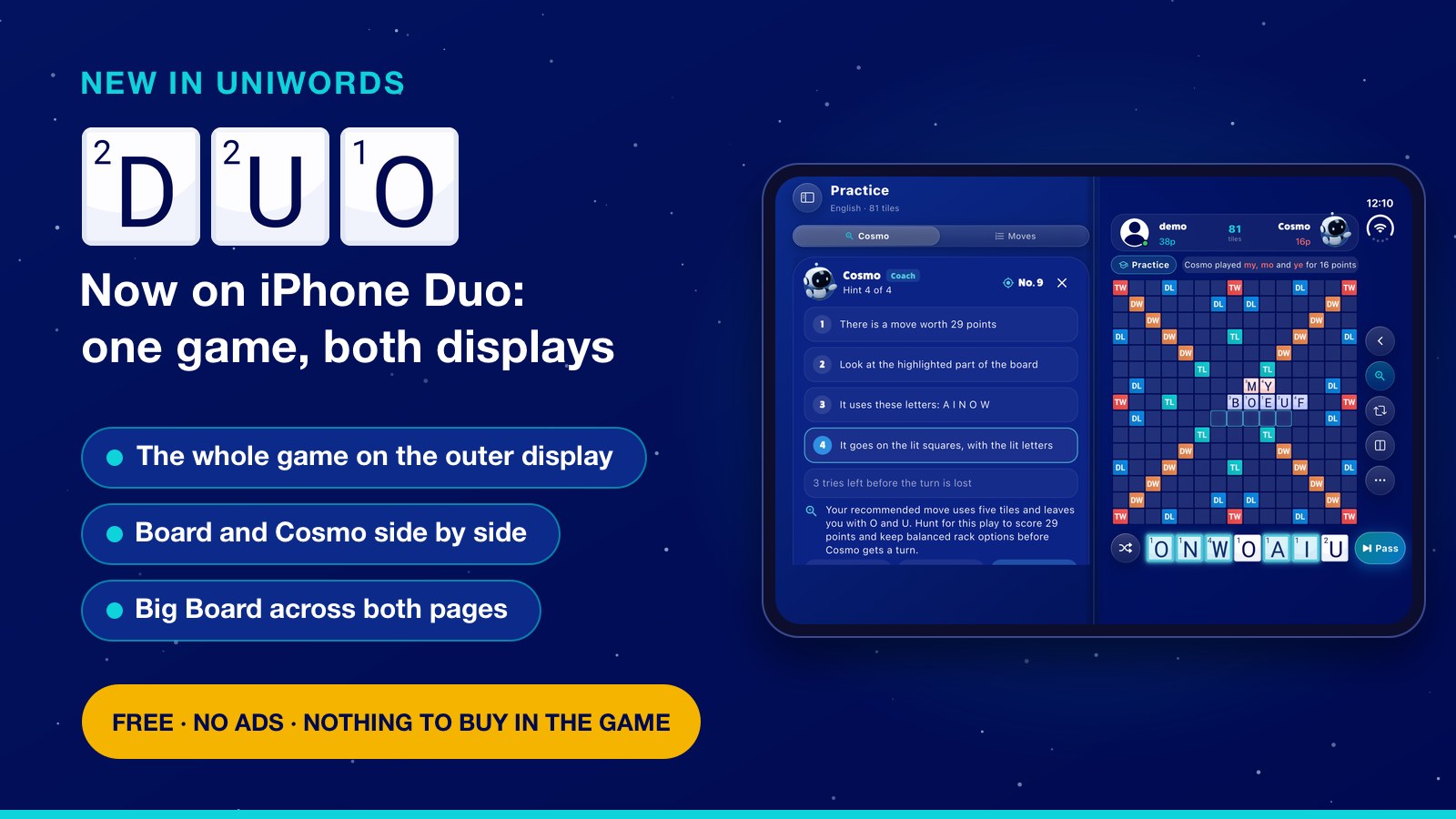
Looking for an iPhone Duo word game? UniWords, a free two-player word board game, supports iPhone Duo from version 3.2.14, released on the App Store on 3 November 2026. Folded, the whole game runs on the outer display. Open in landscape, the board sits on the right half of the inner display, with Cosmo, the practice coach, or the moves on the left. UniWords has no ads and nothing to buy in the game, and it also runs on iPhone, iPad, Android and in the browser at play.uniwords.io, in English or Danish.
Looking for the best free games for iPhone Duo?
If you are searching for the best free apps for iPhone Duo, we think UniWords belongs among them. It is free, with no ads and nothing to buy in the game, and since version 3.2.14 it has its own layouts for the outer display and the open inner display. The 3.2.14 release notes sum it up: “iPhone Duo: the game on the cover and across both pages of the open display, with the controls down the right side where your thumb is.”
How UniWords uses both displays of iPhone Duo
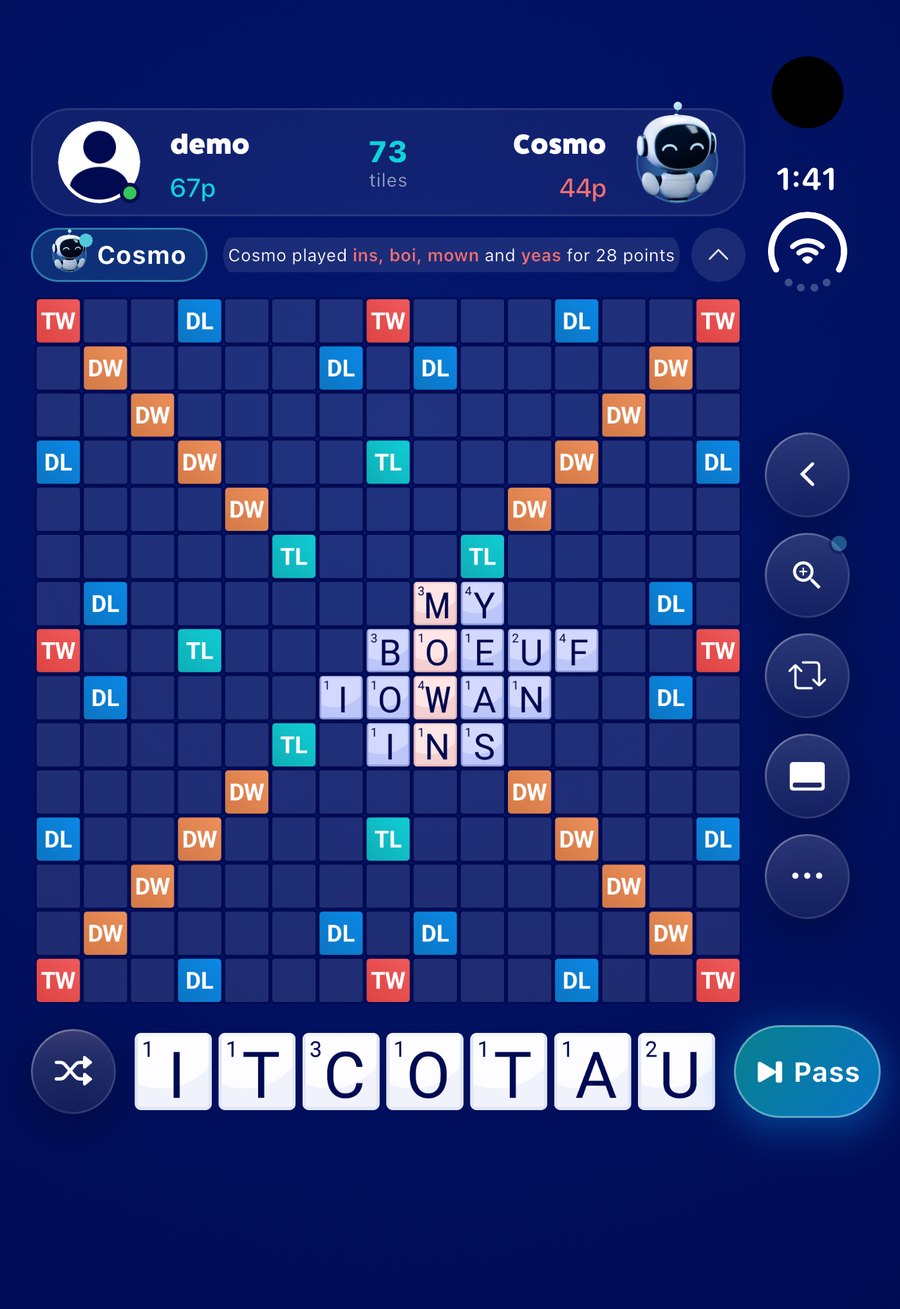
Folded: the whole game on the outer display
The scores, the full board, your rack and the Play / Pass button are all on the outer display. The controls are round icon buttons down the right edge: Back, Hint (in practice games), Chat (when the game has chat), Swap, Layout and … for more. Cosmo’s hints, or the moves, rise over the board as a card. The game calls this layout Board & Drawer.
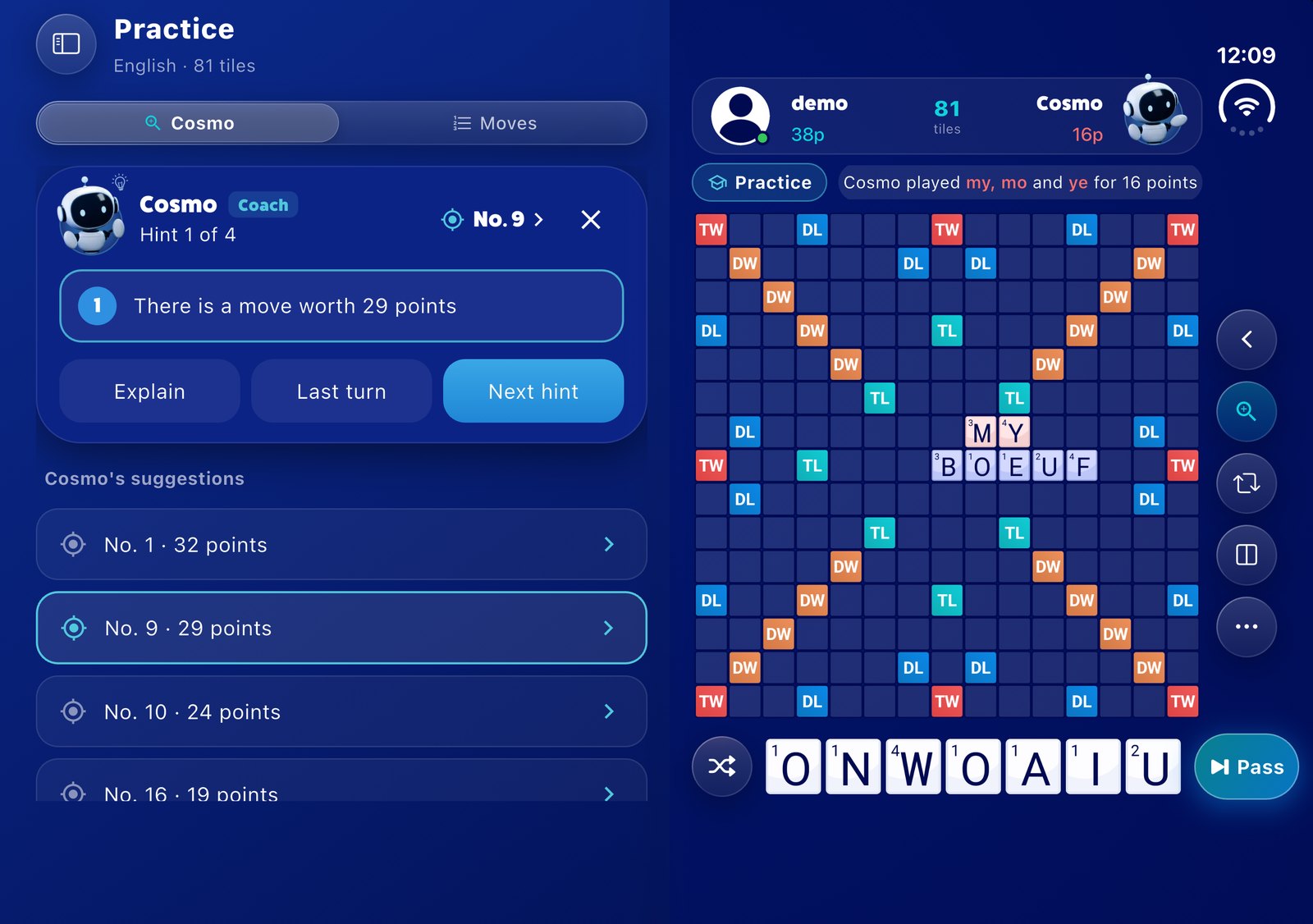
Open: the board on the right, Cosmo on the left
Open it in landscape for Two Pages. The right page keeps the outer display’s layout in the same place, so the board does not move. The left page holds the game’s companion: Cosmo | Moves in a practice game, Moves | Chat in other games. Chat appears only when the game’s chat is on, and UniWords remembers your choice.
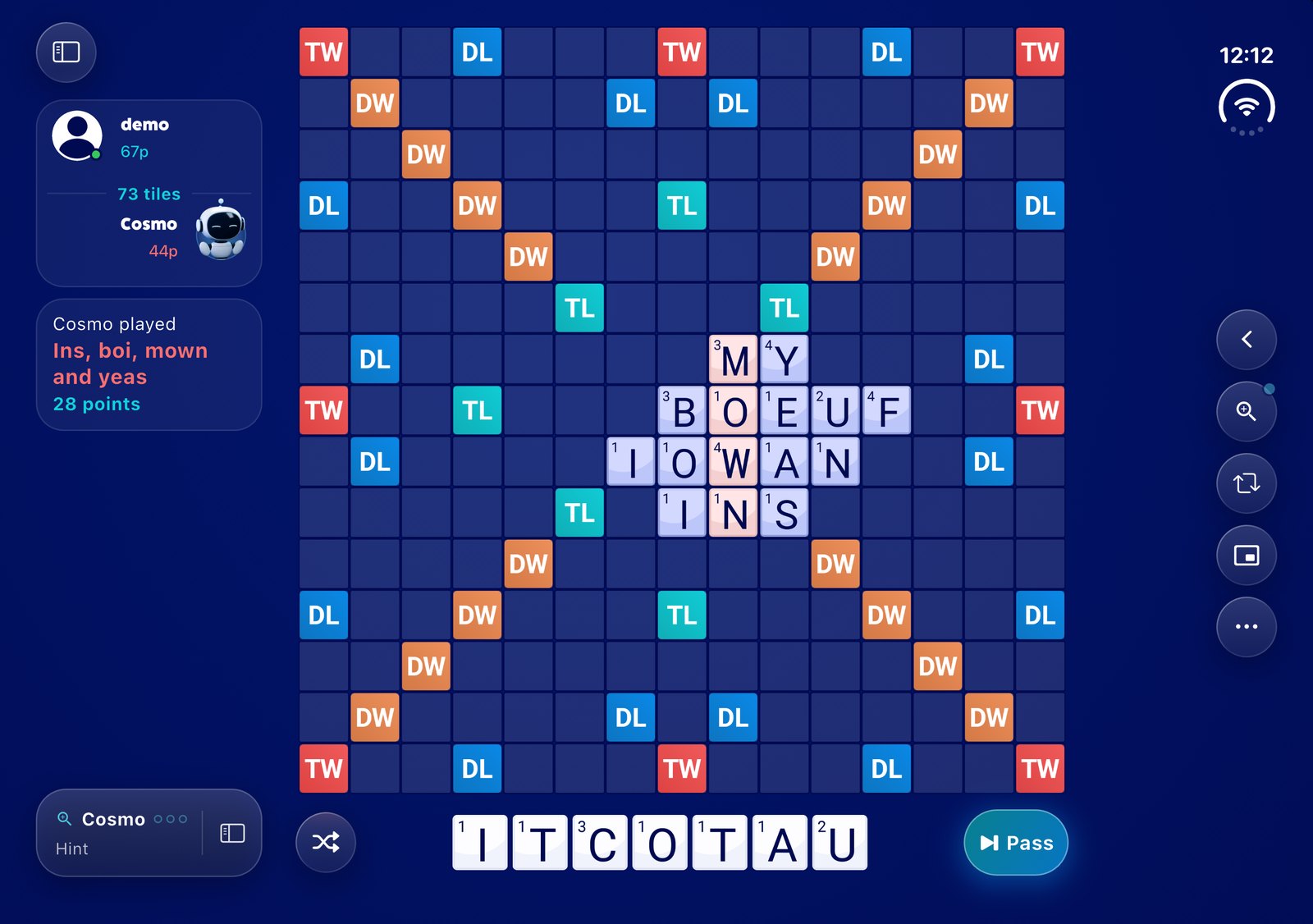
Choose Big Board in the Layout menu, or tap the sidebar button at the top of the left page, to spread the board across both pages, with the fold on a line between two columns rather than through a square. Cosmo, the moves or the chat become a chip in the bottom-left corner. Every unfold into landscape starts in Two Pages.
Looking for an alternative to Scrabble on iPhone Duo?
UniWords is a free word board game that supports iPhone Duo, and the idea will feel familiar: seven letter tiles each, connected words on a 15×15 board, double and triple squares, and a 50-point bonus for using all seven tiles in one move. It is its own game, with a Classic board or a Random board where the premium squares move around. Play friends, random opponents, the computer at three levels or Cosmo. English words are checked against a dictionary powered by data from Oxford Languages.
When we checked the US App Store on 4 November 2026, the “Contains” line on the listings for Scrabble GO, Words With Friends and Wordfeud included Advertising, and all three listed In-App Purchases. See how UniWords compares with Scrabble GO, Words With Friends and Wordfeud, or read about our free Scrabble alternative with no ads. UniWords is not affiliated with the owners of these games.
Is UniWords one of the best-looking games on iPhone Duo?
We think so, but judge for yourself. These are the details we worked on:
- A calm unfold. The board holds still while the left page clears from a blur, sharp about half a second after the display is flat.
- One smooth switch to Big Board. The board and your rack travel as one piece, in under half a second.
- Controls where your thumb is. Glass-style buttons run down the right edge and shift down when a call needs room.
- Previews in the Layout menu. With the display open in landscape, hold a finger on Two Pages or Big Board in the Layout menu and that layout appears behind the menu.
- An animated coach. Cosmo waves, cheers and reacts to your moves.
- Reduce Motion and VoiceOver. Fold animations become short fades, and VoiceOver announces the switch between Two Pages and Big Board.
No ads and nothing to buy in the game
UniWords has no ads and nothing to buy in the game, on iPhone Duo and everywhere else. Cosmo’s hints are free to use, with no limit you pay to lift. When we checked on 4 November 2026, the “Contains” line on the UniWords App Store page did not include Advertising, and Google Play showed no “Contains ads” label. Here is what no ads and nothing to buy in the game means in practice.
How to play UniWords on iPhone Duo
- Install or update UniWords from the App Store (version 3.2.14 or later).
- Tap the round + button (New game), then Practice (“Learn from a coach and get hints”).
- Under Choose language, pick English, choose a Board type and tap Start game. If you already have a practice game going, it opens instead.
- Folded, tap the magnifying-glass button (Hint) in the right-hand column, or the Cosmo line under the scores, to raise Cosmo’s hints over the board.
- Unfold in landscape. The board stays put, and Cosmo’s page appears on the left by default. Switch to Moves for the game so far.
- Open the Layout menu and choose Big Board for the full-size board or Two Pages to go back. The sidebar button on the left page, and on the chip in Big Board, does the same.
Cosmo has no difficulty setting; for Easy, Medium or Hard, choose Play vs AI. More on practising with Cosmo, the free coach.
What you need
- iPhone Duo, which Apple says comes with iOS 27.1. UniWords needs iOS 15.0 or later.
- UniWords 3.2.14 or later, free on the App Store, where the app has been available since December 2021.
- No account to start. Try it as a guest, or sign in with Apple, Google, Game Center or email.
Where to play
Play free in your browser, or get the app on the App Store or Google Play. All links are on our download page, and more answers are in the UniWords FAQ.
Frequently asked questions
Does UniWords support iPhone Duo?
Yes. From version 3.2.14, released on the App Store on 3 November 2026, UniWords has its own layouts for iPhone Duo. The game runs on the outer display, and on the open inner display in landscape the board sits on the right page with Cosmo, the moves or the chat on the left.
What is Big Board in UniWords?
Big Board is a UniWords layout for the open inner display of iPhone Duo in landscape. It spreads the board across both pages, with the fold on a line between two columns. Choose Two Pages in the Layout menu to go back.
Is there a word game like Scrabble for iPhone Duo?
Yes. UniWords is a free word board game on a 15×15 board with double and triple squares, and it supports iPhone Duo. It is an independent game by Axel Software ApS in Denmark and is not affiliated with Hasbro or Mattel.
Does UniWords have ads or anything to buy in the game?
No. UniWords has no ads and nothing to buy in the game. It is free on the App Store, on Google Play and at play.uniwords.io.
Can I play against the computer on iPhone Duo?
Yes. In UniWords, tap the + button (New game), then Practice, to play Cosmo, a free coach who gives hints step by step, or choose Play vs AI and pick Easy, Medium or Hard. Practice games do not affect your rating.
Does the UniWords iPhone Duo layout work in the browser, on iPad or on Android?
No. The two-page layouts are only in the iOS app on iPhone Duo. In the browser, including Safari on iPhone Duo, on iPad and on Android, UniWords keeps its usual layout.
SCRABBLE® is a trademark of Hasbro, Inc. in the USA and Canada and of J.W. Spear & Sons Limited, a subsidiary of Mattel, Inc., elsewhere. Words With Friends and Wordfeud are trademarks of their respective owners. UniWords is an independent game by Axel Software ApS and is not affiliated with, endorsed by or sponsored by Hasbro, Mattel, Scopely, Zynga or Bertheussen IT. Apple, iPhone, iPad and Safari are trademarks of Apple Inc., registered in the U.S. and other countries and regions. iPhone Duo is a trademark of Apple Inc. App Store is a service mark of Apple Inc., registered in the U.S. and other countries and regions. UniWords is not affiliated with, endorsed by or sponsored by Apple.